Count the reading, not just the typing
Stop the clock whenever the keyboard goes quiet and a day of reading looks like nothing. Hourray changes the label instead.
It measures the day as it actually went, then hands it back in sentences you can check, correct and send.
Written from what the code actually does, not from a wish list. If anything here isn’t true of Hourray 1.10.4, that’s a mistake on this page. Please tell us at bkeepersja@gmail.com.
Stop the clock whenever the keyboard goes quiet and a day of reading looks like nothing. Hourray changes the label instead.
Stop typing with Chrome in front and the time still counts as work, up to a cap you set.
The cap is 45 minutes to begin with, and you can set it to 15, 30, 60 or 90 instead. So an hour with a contract open, or a call you're only listening to, isn't a hole in the day.
Past the cap the time is cut back out and marked away, not left running.
A laptop left open overnight never turns into a night of work.
Reading and typing stop counting when you lock the screen. Only a call already running keeps going.
That means one you logged with Log a call, a meeting from your calendar that Hourray was already counting, or a call in a Chrome tab that's still playing sound. If you logged it yourself, press End call when you hang up. The locked time itself is written down. It counts for nothing on its own, but it is listed under Time away from Chrome, so an hour you spent in a meeting away from the keyboard is one answer away rather than a hole you have to notice.
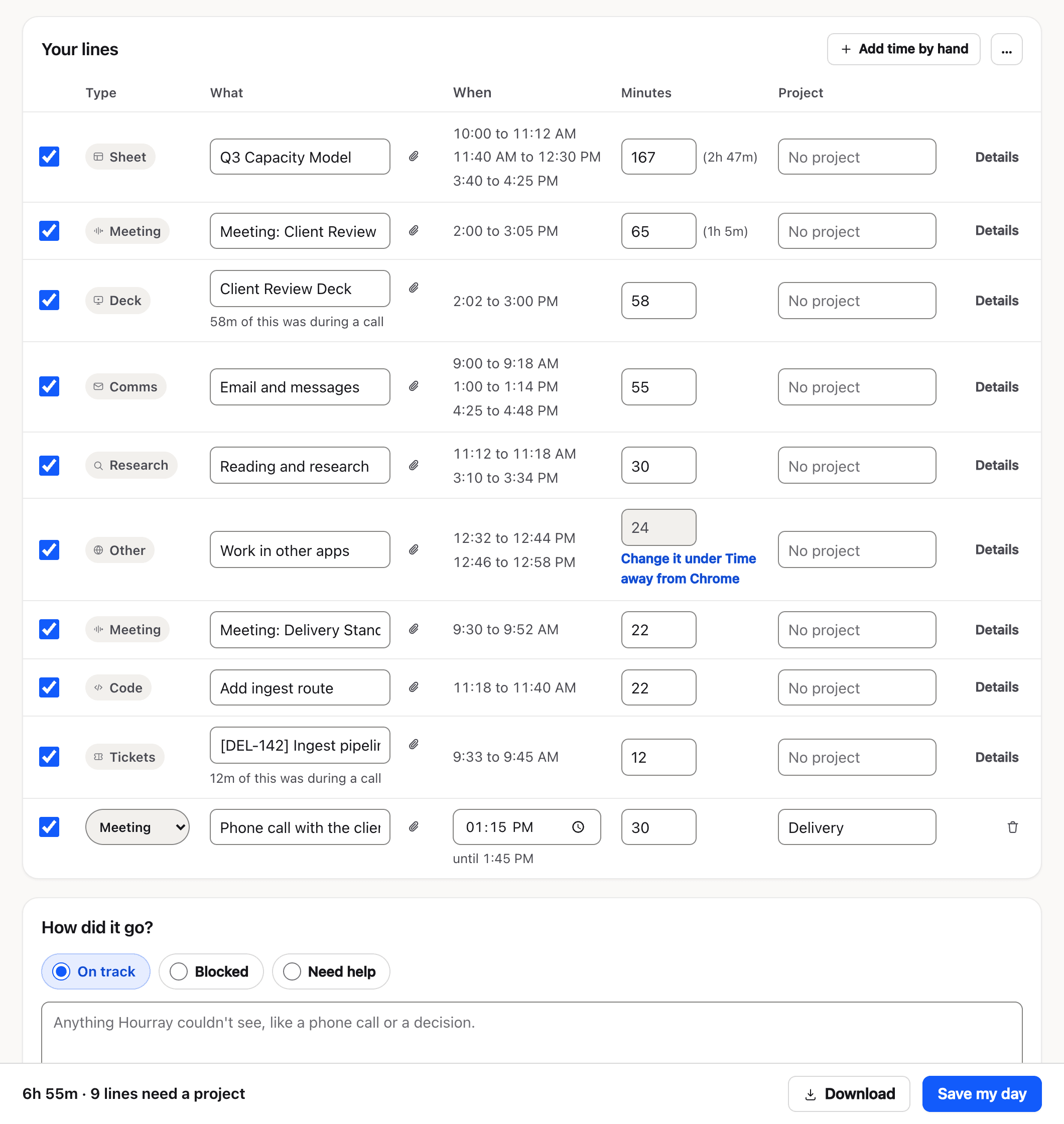
Edit a document during a call and the minutes belong to the call. The line still shows, and says how much of it was during the call.
So the lines, what you copy and what you export all add up to the same day, and unticking a line takes its time off the day. A line you add by hand with a start time follows the same rule: only the part Hourray hadn't already counted is added. A line with no start time can't be checked against the clock, so its minutes are added in full. Give it a start time if Hourray may already have counted some of it.
The same spreadsheet opened six times across a day is one line that took six sittings, not six separate visits to explain.
Each line says when you worked on it: the times you were actually there, not just the first and last minute. Glancing at another tab for under a minute and a half doesn't count as leaving, and you can change that in Hourray's settings.
About sixty services recognised, from Meet and Zoom to Jira, Linear, GitHub, Figma and Notion.
Meetings, docs, sheets, decks, code, tickets, design, email and chat, AI assistants, video and admin.
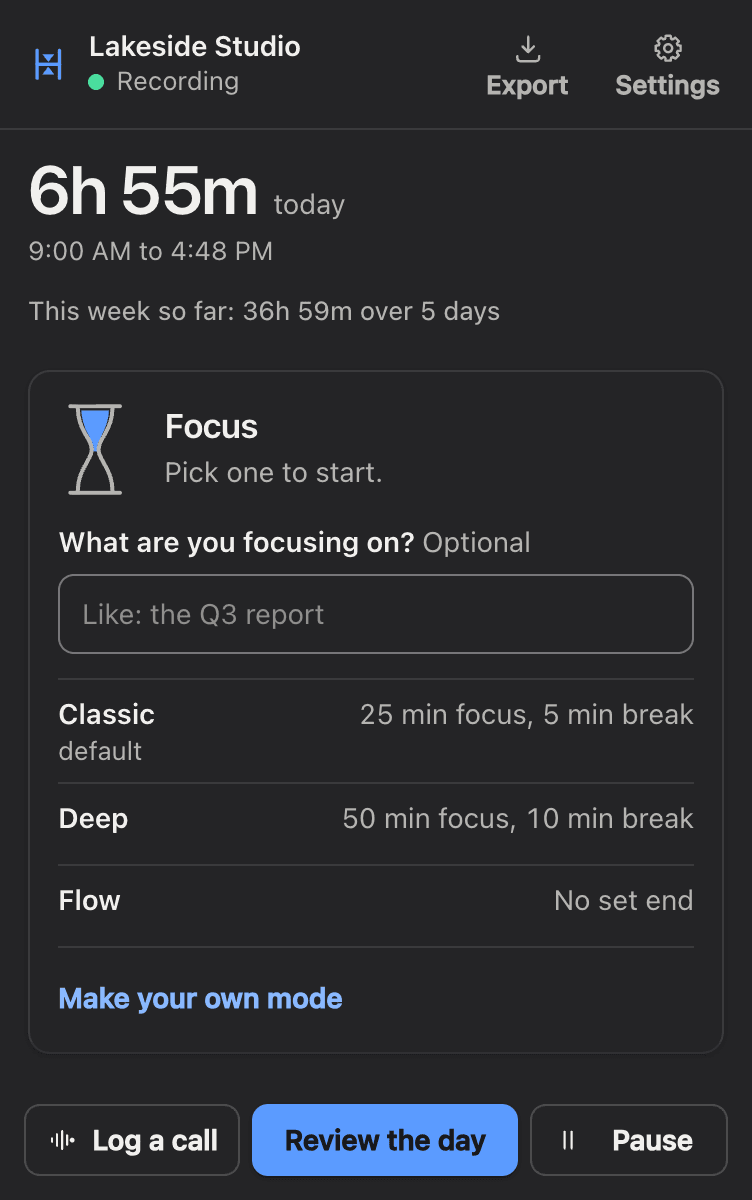
Hourray already counts the hours, so its focus timer has nothing to prove. It runs rounds of work and breaks, keeps what you say about them, and leaves the tracking alone.
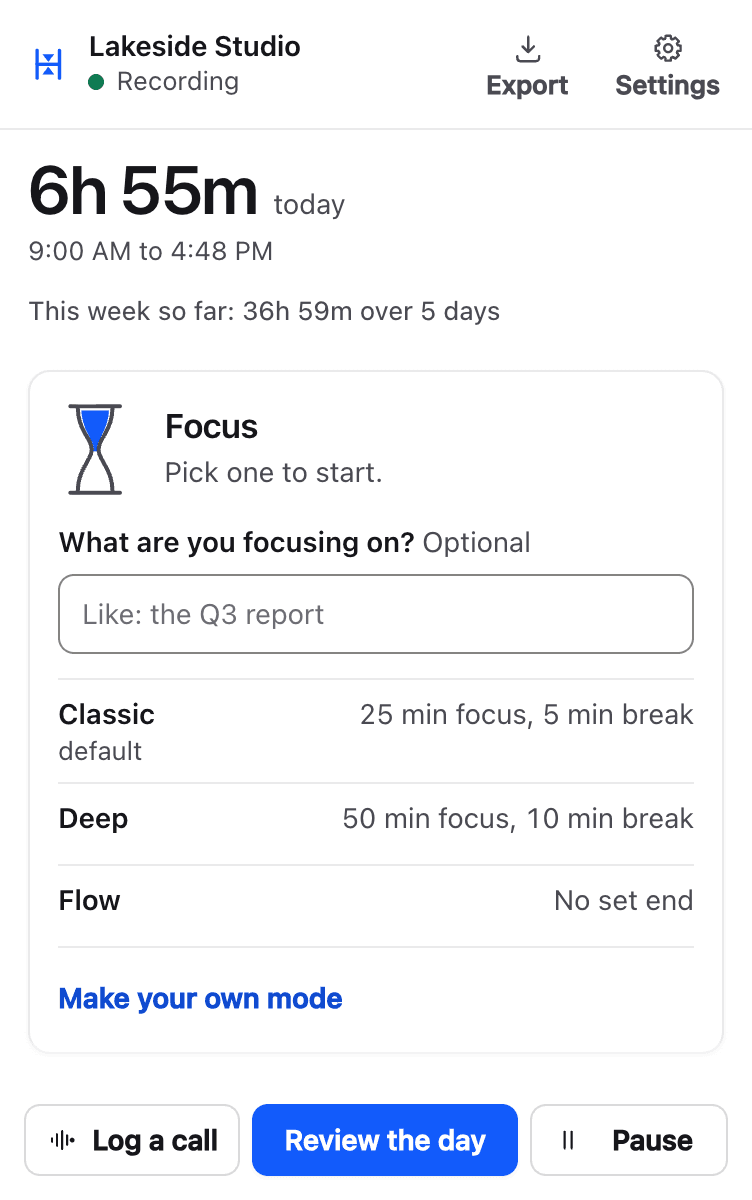
Classic is 25 minutes of focus and a 5 minute break. Deep is 50 and 10. Flow has no set end and counts up until you stop it.
Every one of those lengths can be changed in settings, from 5 minutes to 3 hours of focus and from 1 to 60 minutes of break.
After four rounds the break is 15 minutes instead of 5. You can change the number, or switch the long break off.
Up to eight modes of your own, each with its own lengths, its own long break, and a project that goes on every session you run with it.
Any of them can be the one that starts by default, and starting it is one click in the popup.
Sand in the top is what is left of the round, the pile below is what you have spent, and a thin line falls between them while it runs.
The sand holds still for anyone who has asked for less motion, and the break runs it in grey.
Say what you are focusing on before a round, and what got done after it. Both optional, and both in your own words.
The review screen lists the day's sessions with what you wrote, and the day's summary, the PDF and the Markdown export mention them. The spreadsheet columns are unchanged.
Half an hour to four hours of focus a day, on working days or every day, drawn as a thin bar.
It says “Goal reached today” in words when you get there. There are no streaks and no scores, because a tracker that scores you is a tracker you start lying to.
List the sites that pull you away, and during a focus round opening one gets a single quiet notification with Back to work and 5 more minutes.
One reminder per site per round. It never blocks a site, never closes a tab and never redirects you, and the list is only ever compared on your own computer. Off until you turn it on, and the list starts empty.
What is left of the round shows on Hourray's icon, so you don't keep a tab open to watch it. A notification says when the round or the break is over.
A focus session is laid over the day, not counted instead of it. The one thing it changes: while a round runs, quiet reading keeps counting past your reading limit, because you have said you are working.
The limit starts again when the round ends, and locking the screen still stops the clock. The session keeps its own record too: when it started and ended, its rounds and mode, and a project or your own words if you add them.
Give one of your modes a project, and whatever you work on during its rounds goes under that project, ahead of your project rules.
A document used both inside a round and outside it becomes two lines with the same name, the one from the round marked Focus time for that project. They are split to the millisecond, so they add up to the old line and the day's total never moves. A project you set by hand still wins, and focus never makes a rule of it.
Walk away and the countdown stops where it is. Nothing starts it again by itself: when you come back the popup asks whether to carry on or end it.
There is no “are you sure?” on ending one. Ending early simply ends.
A tab can sit open while you are nowhere near it, and plenty of calls never touch Chrome at all.
Counting starts when you join, and the whole call counts until you close its tab.
You have joined when the call's tab is the one in front, or it's playing sound. From then on it counts while you present, take notes or work in other tabs. A link that hands the call to the Zoom or Teams app is different: the page it leaves behind counts for two minutes, and the review asks whether the time after it was the call. A Meet link left open all afternoon that you never joined is not a meeting.
Press Log a call in the popup and the time counts as a meeting, with no call open in Chrome.
Name the call or just press OK. From then on the keyboard doesn't matter. Press End call when you hang up. If you forget, it ends itself after three hours, so a forgotten call can't run all night.
Paste the private link your calendar already gives you. A quiet time inside a meeting becomes that meeting.
Google Calendar calls it the secret address in iCal format. The meeting is named after the event and ends when it ends. There's no Google sign-in and no account to connect. Hourray only reads the link: it never writes to your calendar and sends nothing about you.
Daily, weekly and monthly series, including every other week and ones that stop on a date.
Weekly ones on the days you set, monthly ones on the same date each month, a set number of times or until an end date. Cancelled and moved meetings, timezones and daylight saving are handled too.
Tracking carries on as if no calendar were connected, until the link loads again.
Hourray's settings page tells you it couldn't be read, with a short reason.
Every day arrives as a draft with its reasoning attached. Save it when it looks right, or let it save itself.
Attach a link, a note, or a file to any line of the day, recorded or added by hand, so the evidence sits beside the hours it belongs to.
Files are PDFs, JPGs and PNGs, kept in Hourray's own storage on this computer where no website can reach them. They go into an export or a backup when you save one, and they are deleted with their day.
Any quiet time of five minutes or more that your calendar can't explain becomes a one-click question: reading, a call, or away.
Away cuts the time back out, on a call raises it to a meeting, and reading changes nothing because it was already counted.
Same page, same sort of time of day: after four consistent answers it decides for itself and tells you which pattern it used.
A meeting on your calendar always beats a learned habit, because a schedule is evidence and a habit is a guess.
Every line can show where it came from.
How many sittings, how much was reading, how much ran during a call, how much fell outside your hours.
Untick, rename, correct the minutes or assign a project. Nothing you change gets re-guessed.
Not even after you answer a quiet time. Open a day you've already saved and you see it as you saved it, ready to change, and the same goes for a day Hourray saved for you. Untick everything and it won't save an empty day over it, so one slip can't wipe it.
Press Add time by hand for a phone call away from the desk, a meeting in person, work on paper.
Say what it was, how long and which project. It's kept as you type and counts toward the day's total straight away, even before you save the day. Pick a kind or type your own (“phone call” counts as a meeting). Leave out the start time and every minute counts. Give it one and only the part Hourray hadn't already counted is added. If any of that falls outside your working hours, it shows up under Outside your hours.
Every meeting has an Add notes link: paste the notes, the transcript or the recording.
It stays with that meeting through saving, reopening and every export. Hourray has no microphone and no camera, and will not be getting either. Keeping the link to whatever already wrote your notes is the honest version of the same thing.
Typing with Chrome in the background counts, as one line a day for you to name.
Desktop Word, Figma, a terminal: it arrives as Work in other apps, ready for a project. Hourray can see that you were at the keyboard, never which app, so it never pretends to know. Untick the line on a day it wasn't work and its time comes out of the day, or turn the whole thing off under Count time in other apps. Days from before it was switched on keep the hours they had.
A locked screen, a sleeping computer, a closed browser: the stretch is written down, not left as a hole.
The ones that fall inside your day, five minutes or more, are listed on the review screen under Time away from Chrome. Say what it was, a call, a meeting, work or a break, give it a project, and it counts. It is never counted on its own, because there is no evidence either way. The night either side of your day isn't offered, and nor is anything a meeting or a line of yours already covers. Fill part of a gap and the list shows what is left of it, to the minute.
Time away from Chrome gets one button. Name it, say what kind it was, give it a project, and it counts.
A call, a meeting, work or a break, with the start and end yours to adjust. Or leave it out, and it stays out of your day.
One notification, at a time you choose, and only when there's something to review.
At least fifteen minutes tracked, and the day not saved yet. It's your chance to look the day over before it saves itself.
A day you haven't saved by the time it's over is saved for you as it stands.
Lines added by hand included. If your computer was asleep or Chrome was closed when the day ended, it catches up the next time Chrome runs. Open the day from the review screen and it tells you Hourray saved it for you. Change anything and save it again, and your version replaces it. A day you saved yourself is never overwritten. It only looks back a week, and skips days with less than fifteen minutes tracked. To save only when you press Save my day, turn off Save each day for me in Hourray's settings.
Bigger text where you want it, settings beside your work, and a short walk through the lot.
Text size, Normal, Large or Larger, on every Hourray page.
Hover hints on every icon too, so nothing depends on recognising a symbol.
Settings, your day's review and your exports can open in Chrome's side panel, on the right of the page you're on, instead of taking over a tab.
Under Where Hourray's pages open, in settings.
Pause for 15 minutes, an hour, or until tomorrow, and tracking starts again by itself. Or pause until you turn it back on, if that is what you meant.
The usual way to lose an afternoon is a pause nobody remembered to undo.
A link in settings opens an email to the person who makes it, in your own mail app. There is no form, no ticket and no account.
A welcome when you install it, and a Show me around tour you can start again whenever you like.
Alt+Shift+H brings Hourray up from whatever tab you're on, so looking at the day costs a keystroke instead of a trip to the toolbar. On a Mac that is Option+Shift+H.
The same keys on a Windows PC, a Mac and a Chromebook. They are what Hourray asks Chrome for, and Chrome gives a combination to whichever extension asked for it first, so if you have had Hourray a while you may still have the keys it was given back then. Hourray's settings show the keys you actually have, under Open Hourray from the keyboard, or say that none is set, with a button through to Chrome's own shortcuts page to change them.
The part your manager actually asked for, in a form you can hand over.
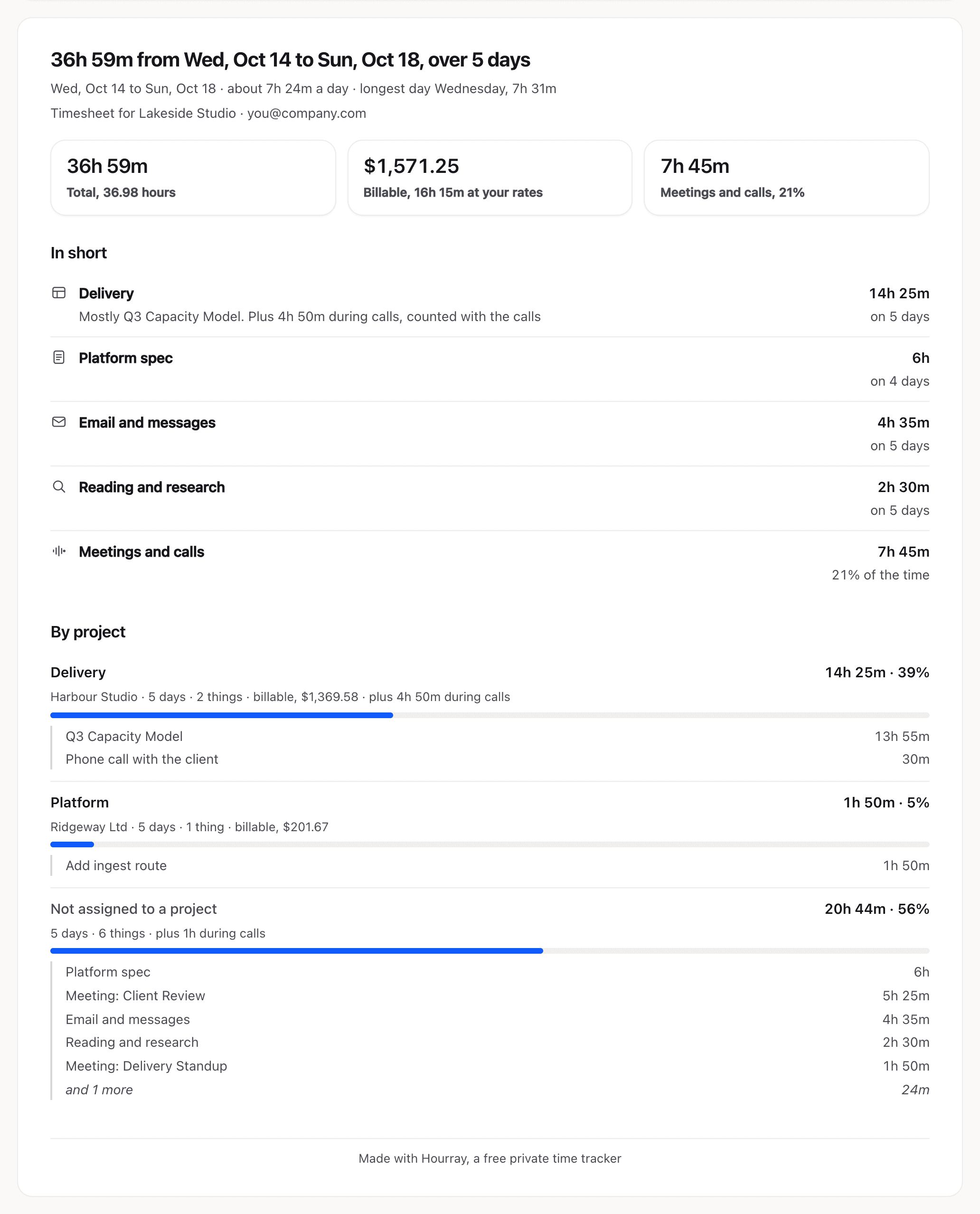
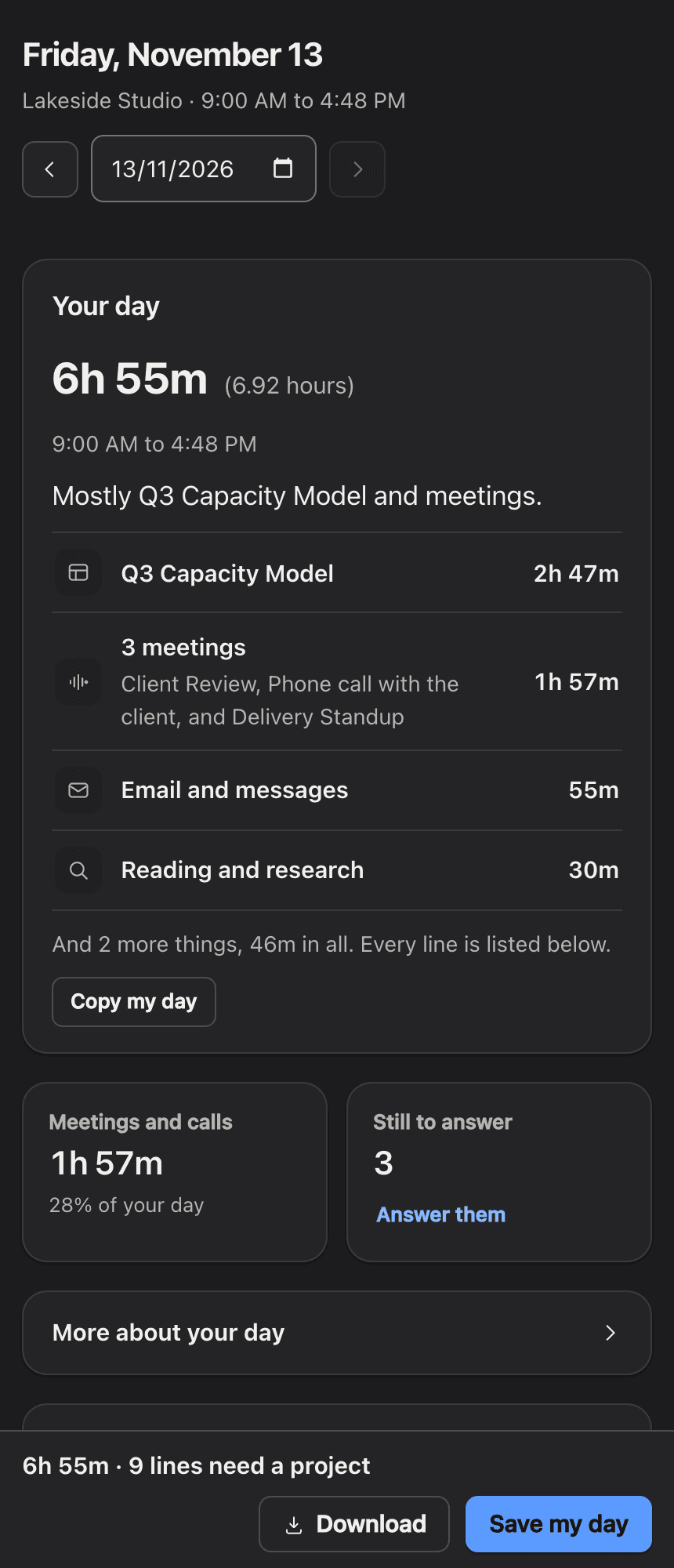
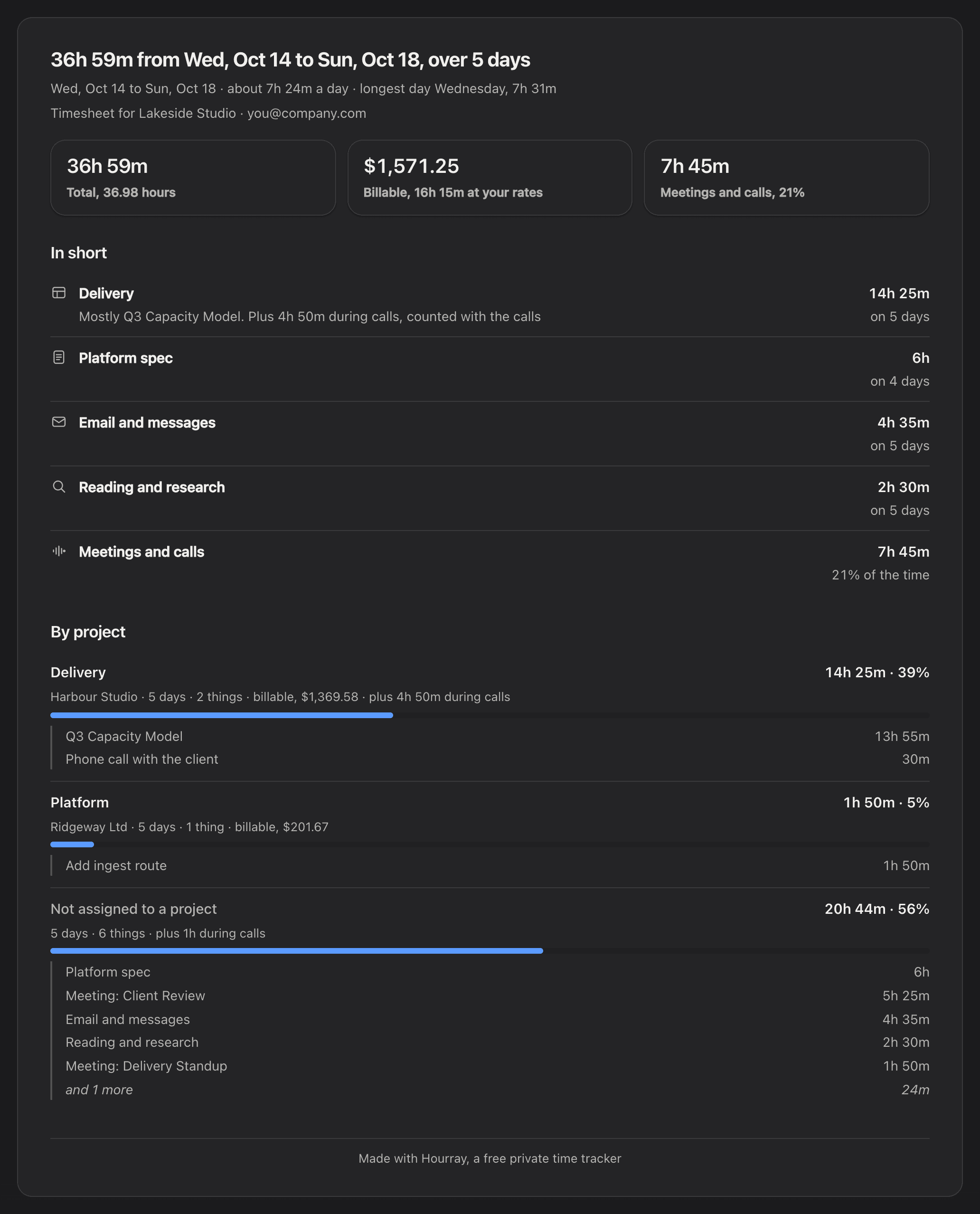
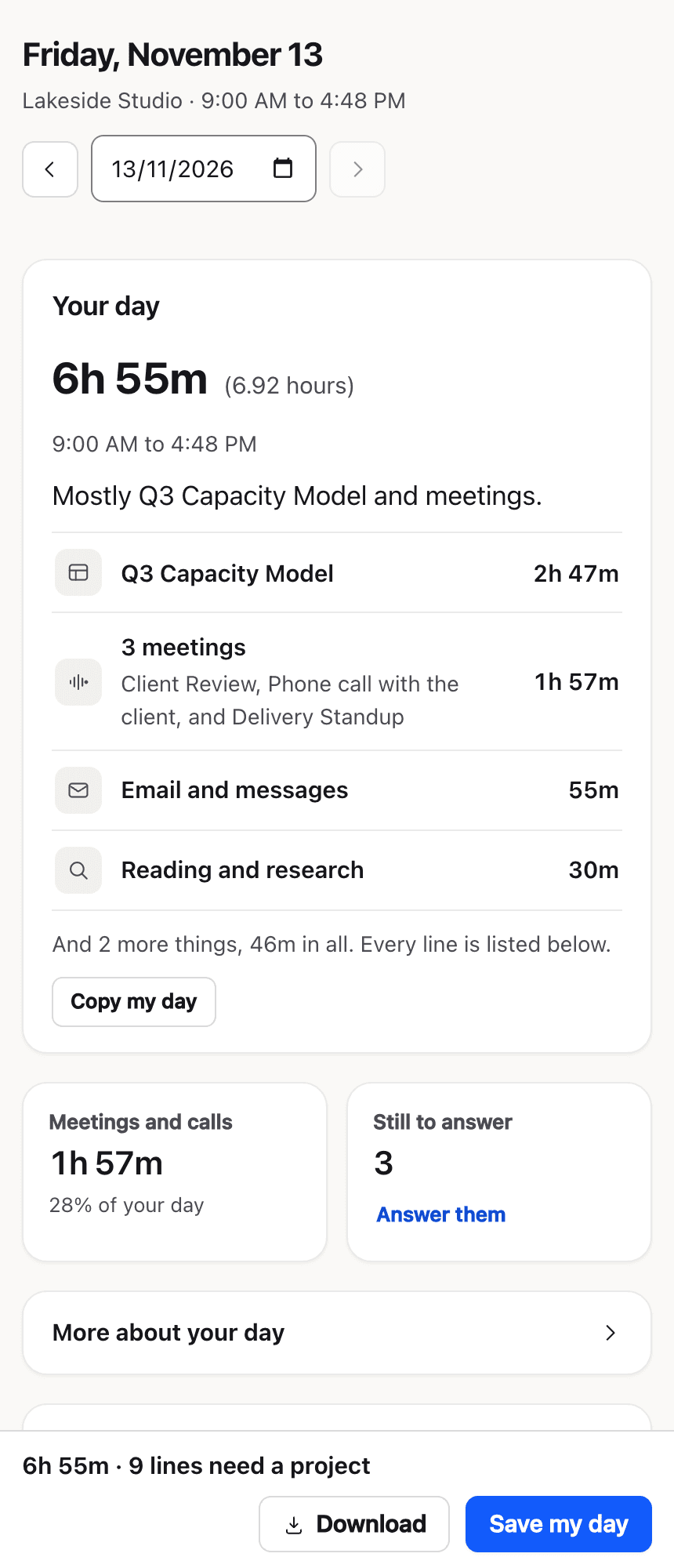
The day in a sentence, then the four things that took most of it: “Mostly Q3 Capacity Model and meetings.”
Because that's what people ask about. Whether an hour went into a deck or a spreadsheet is rarely what anyone needs to know.
Each group carries the things inside it, which matters most for unassigned time: “20h 44m not assigned” tells you nothing, while “20h 44m, led by Platform spec at 6h” tells you what to label.
Assign a line to a project once and tick Remember this mapping.
Next time the same ticket or document, or for anything else the same website, goes to that project for you.
Give a project a client, an hourly rate and a monthly budget, and the report prices the week.
With a breakdown by client and how each budget is running. It follows the project hours already on the page, so a project's value is always its hours times its rate. A budget says where the month is heading at this pace, counted over your own working days rather than calendar ones. All of it lives in this Chrome profile, like everything else.
Summary for a few lines, Everything for the lot, over any dates you pick.
“This fortnight” means last week plus this week so far, from Monday, not the last fourteen days.
Press Save as PDF for something to hand over, or take a spreadsheet (.csv) or a text file (.md) for something to work with.
Round billable time to 6, 15 or 30 minutes, up or to the nearest, per project per day. Leave it off and the minutes are the minutes.
Rounding works from the whole minutes shown, so 15 minutes bills as 15 when rounding up to 15, not 30 because of a stray second.
One click puts the day's hours, by project, on the clipboard, ready to paste into a timesheet.
The date, the day's total, then a line for each project with its client where you've set one.
Search by title, or type project:, kind: or site: to narrow it, for example project:Delivery. Whatever you searched is exactly what gets exported.
Anything outside the hours you set is counted separately, and traced to the work that caused it.
So “I worked late again” becomes a number.
It stays where it was recorded, it gets smaller over time, and you can end it whenever you like.
Chrome's storage on this computer, never the kind that syncs.
So no part of the log is copied to a Google account, or to another computer. Back up everything saves it all to a file you keep. Restoring from one only fills in days you don't already have. A day that's already here is never replaced.
Turn page titles off and no title is written into your day, so none can surface in an export later.
Full URLs are off by default.
A site you would rather Hourray left alone can be blocked from the popup while you are on it, with an Undo if you press it by mistake.
It joins the same blocklist as the sites you add in settings, and is treated the same way.
Count their time as “Private” and record nothing else about them, or record nothing at all.
After a week each day is boiled down to a summary. After a year the day is deleted.
Including what you saved and anything you attached to it. Keep less under Keep history for.
Delete all data, in Hourray's settings, erases everything it has stored, straight away. Removing Hourray from Chrome erases it too.
No third-party code, no analytics, and no code fetched from the internet: everything it runs is in the folder you install. 1170 automated tests run before every release.
Name the workspace, press start, and it's working. Nothing is recorded until you do.
Add to ChromeEveryone installs their own copy, free, and nobody's time is sent anywhere. When someone needs the numbers, each person saves their week as a PDF.
“Mostly Q3 Capacity Model and meetings.”
Word for word from Hourray's toolbar popup, for the day in the screenshots on the home page.
About 60
services it recognises
From Meet and Zoom to Jira, Linear, GitHub, Figma and Notion.
1170
automated tests
Run before every release.
2
reasons it ever goes online
Your calendar link, if you add one, and a check for new versions. Neither carries anything about you.
From a fresh install to a week you can hand over.
Hourray only sees the Chrome profile it's installed in, so your personal browsing stays out of it.
There's no account to make, and nothing is recorded until you press start.
It notices which document, ticket or call you're in, and for how long, reading and listening included.
Paste its private link and meetings take their names from it. There's no sign-in.
Answer a quiet time, fix a line, add a phone call, then press Save my day. Or let the day save itself.
Save it as a PDF, or take the numbers as a spreadsheet or a text file.
The site and page title of the tab you are in, how long you were there, and whether you were typing. Never what you typed. Page titles can be switched off, and full URLs are off unless you turn them on.
No. It goes online for two things only: your calendar link, if you add one, and a check for new versions. Neither sends anything about you.
Yes, as one line a day you name yourself. Hourray can tell you were at the keyboard, never which app, so it does not guess. Turn it off under Count time in other apps.
In a Chrome tab, logged with Log a call, or on the calendar you connected: it counts in full. Otherwise the stretch is listed under Time away from Chrome, one answer away from counting.
It saves itself once the day is over, lines added by hand included, and you can still change anything. To save only when you press Save my day, turn off Save each day for me.
Nothing. There's no account, no seats and no plan to choose. On a team, everyone installs their own copy.
Chrome 116 or later, on a Mac, a Windows PC or a Chromebook. From the Chrome Web Store it is one click. Installed from a folder instead, it needs Developer mode switched on, which some company-managed computers don't allow.
Yes, and that is the way in: one click, and Chrome keeps it up to date. A Mac installer and a folder you load yourself are still there for anyone the store cannot reach.
Six steps, no account, and nothing is recorded until you press start.